Capture Studio
Capture Studio gives you specific guidance for turning an interesting deep-sky subject into a practical capture plan. It brings framing, filter choice, sub-exposure length, and total integration planning into one place so you can see how your subject, equipment, site, and goals fit together before you commit a night to the project.
Capture Studio is part of the overall planning flow in AstroGuide:
- Seasonal awareness
- Goals and objectives
- Monthly and nightly planning
- Capture Studio
- Results
Capture Studio is made up of four related advisors:
- Framing Advisor lets you visualize how your subject will be framed with your equipment.
- Filter Advisor evaluates how different filters interact with the chosen subject.
- Sub-Length Advisor recommends a sub-exposure length based on the subject, equipment, site, and conditions.
- Integration Advisor estimates total integration time for your desired result quality and the rest of your capture plan.
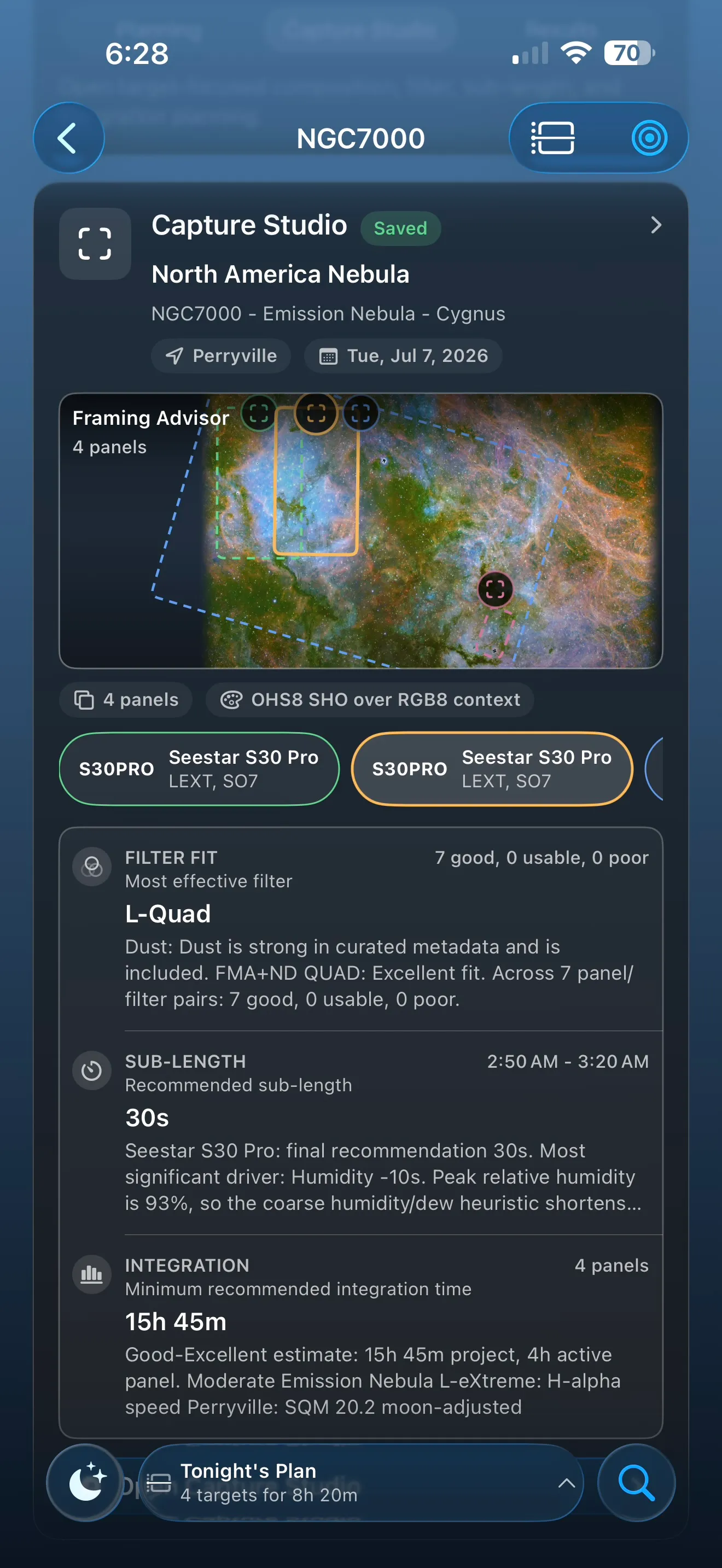
The Subject Detail screen provides a Capture Studio overview between the Planning and Results tabs. This overview gives a high-level summary of the guidance offered by each advisor. Those summaries are enough for casual planning; AstroGuide Pro unlocks more detailed advice, explanations, and planning tools.
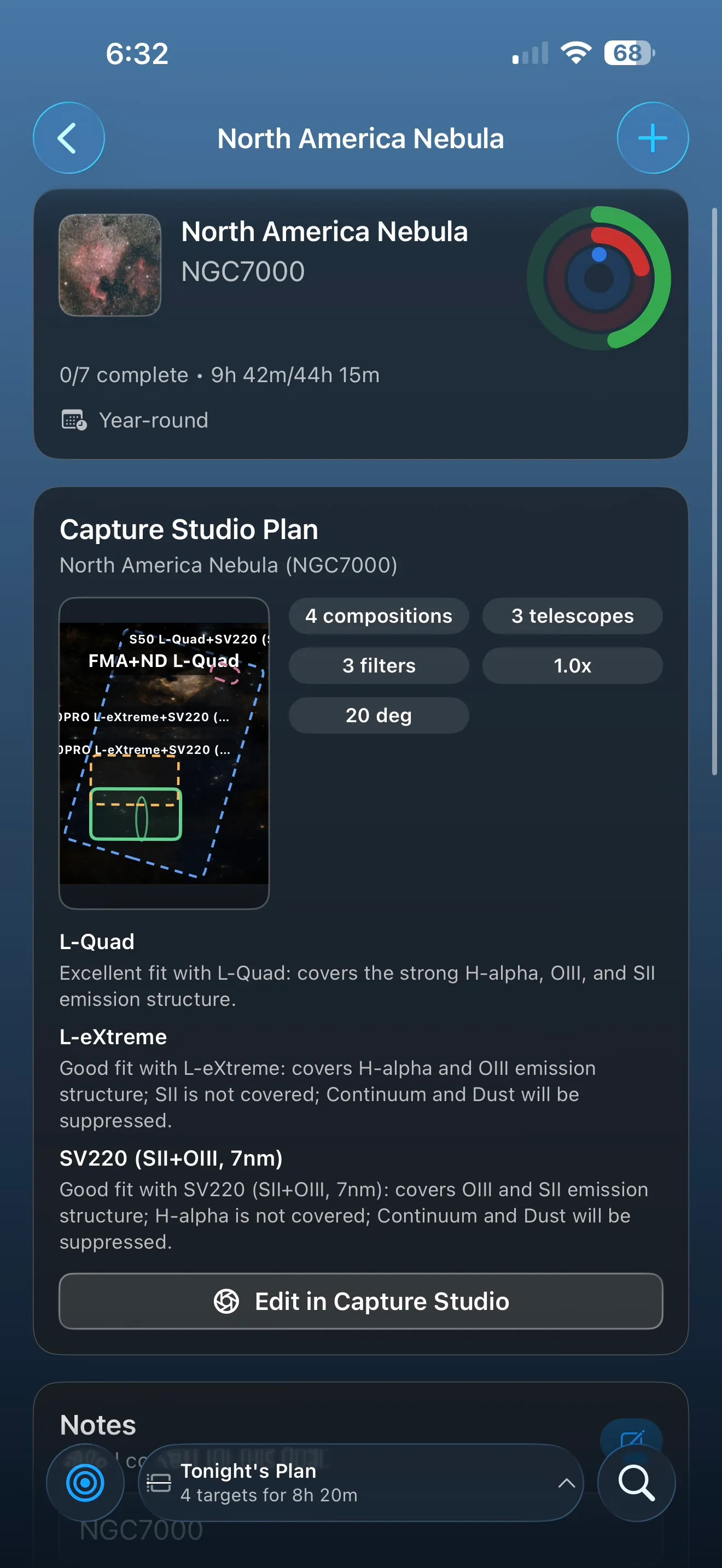
Capture Studio ultimately creates a comprehensive plan that includes the subject, equipment, filters, framing, and timing goals needed to realize your vision. AstroGuide Pro users can save that plan as a Goal, then automatically track progress toward that goal as capture sessions are imported into Results.
Framing Advisor
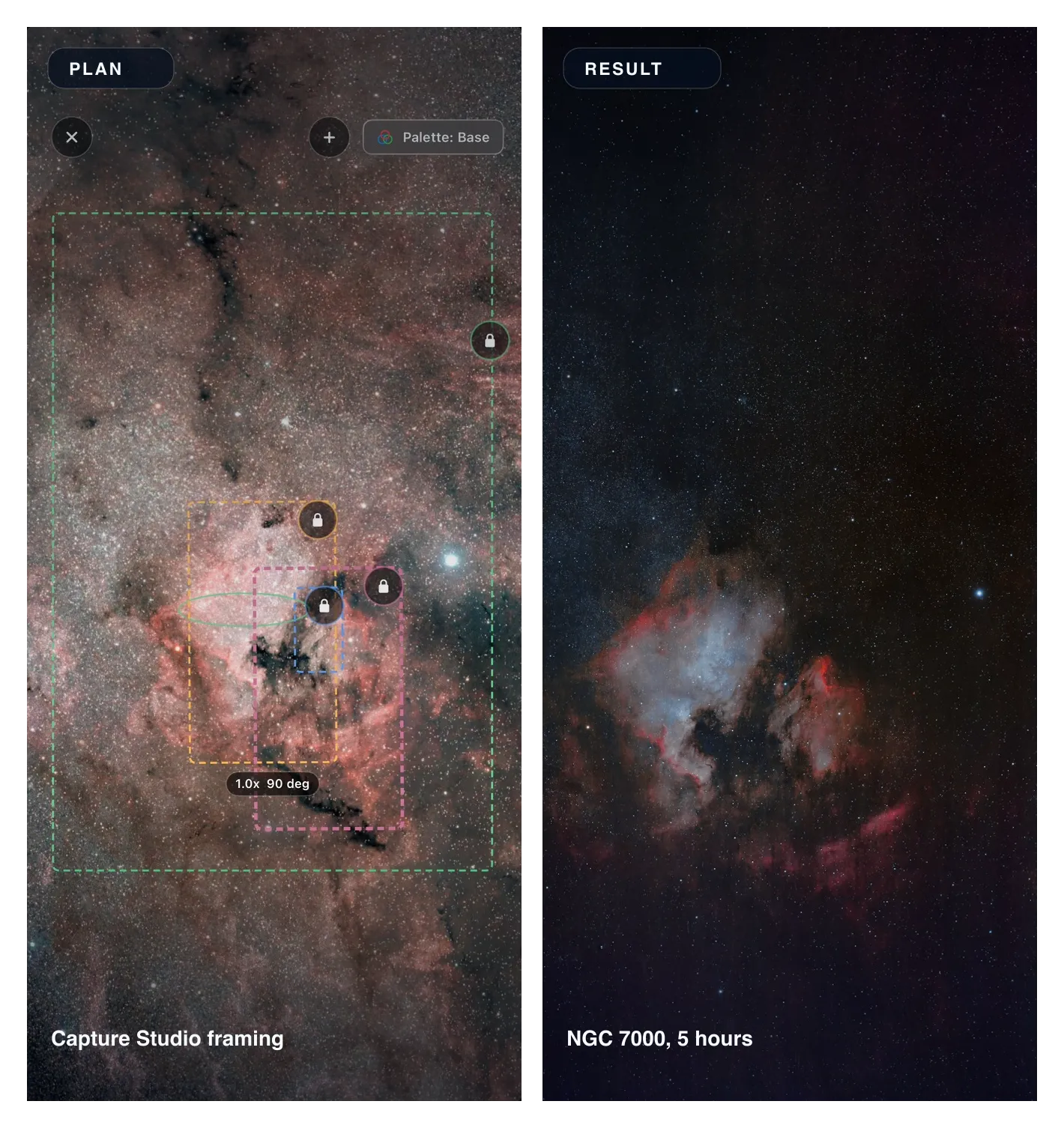
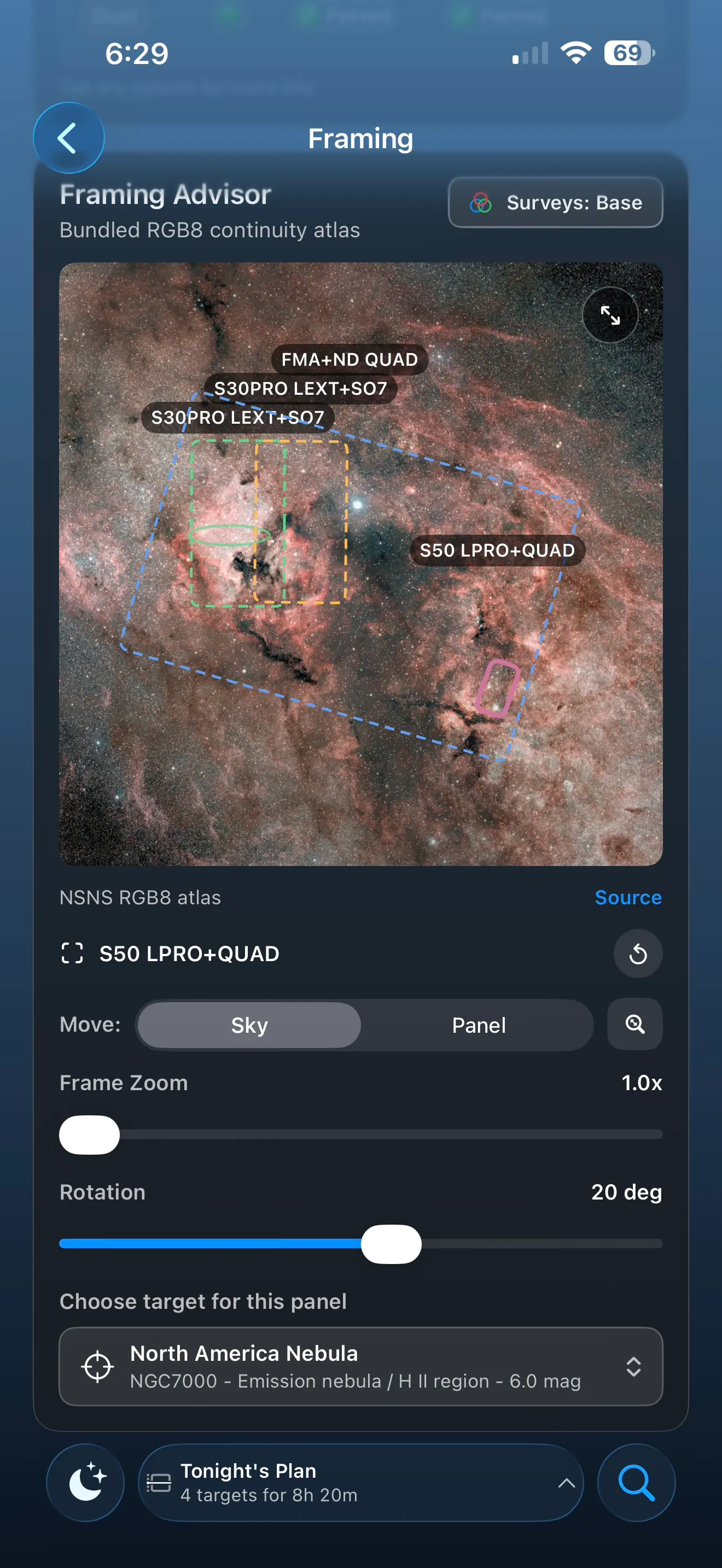
Framing Advisor helps you visualize options and alternatives for capturing a subject.
Panels
Panels represent each complete image you intend to capture. You can plan a single panel or use Framing Advisor to design complex, multi-panel compositions. Each panel is defined by these attributes:
- Telescope: the telescope determines the field of view used for the panel.
- Filter or filters: filters let you compare how each filter's characteristics complement the chosen subject.
- Framing adjustments: position, frame size, and rotation let you refine the composition.
- Subject: for complex compositions that cover multiple deep-sky objects, each panel can have its own subject.
Survey Visualization
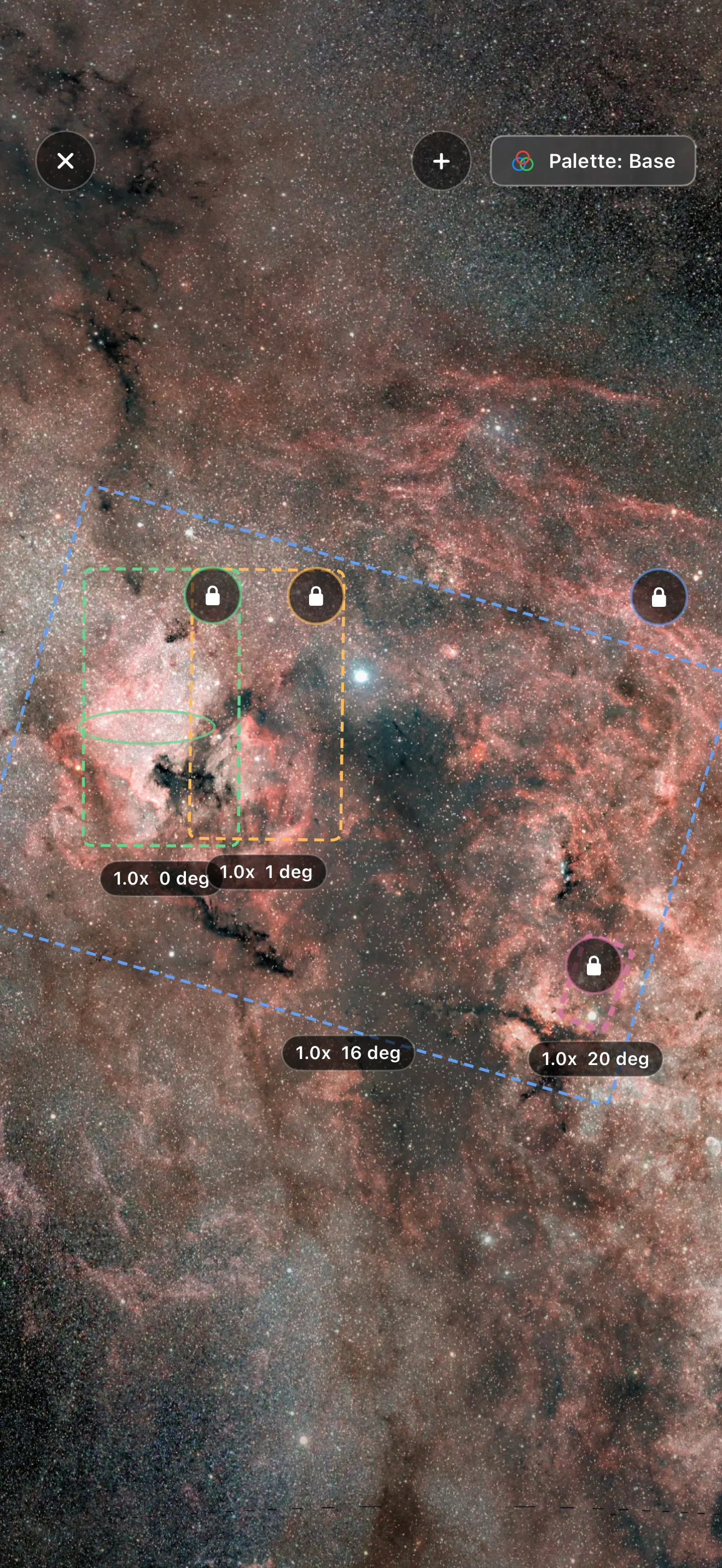
The panels you define are visualized with deep-sky survey data. This gives you an approximation of what your result could look like in terms of scale, framing, and overall context.
Of course, actual capture quality depends on many factors. Survey views are meant to suggest what is possible, not predict your final image.
Capture Studio can use several preview layers:
- Base: a high-resolution visible-light survey of the northern sky.
- DSS2 color: a whole-sky survey similar to the presentation used by the Seestar app.
- Infrared: useful for seeing structures that may not stand out in visible-light previews.
- H-alpha: useful for identifying strong emission subjects.
- Dust: useful for identifying subjects with strong dust features that may benefit from broadband and narrowband imaging.
- Narrowband surveys: for selected areas of the northern sky, additional data can visualize subjects with popular narrowband palettes, including a Hubble Palette baseline and variants such as SOH, HSO, OSH, OHS, HOO, and SOO.
A full-screen mode is also available. It provides a larger canvas for designing captures and a more direct, gesture-driven model for editing framing choices.
Filter Advisor
In astrophotography, filters can intentionally accentuate or de-emphasize different parts of the subject being captured. For example, when photographing nebulae, you might choose filters that accentuate light from specific elements to bring out stronger contrast. When photographing from light-polluted areas, you might use filters that suppress wavelengths commonly emitted by streetlights and other artificial light sources while preserving more of the light you want from the subject.
Filters work through coatings and optical design that influence how captured photons reach the red, green, and blue sensors in a color camera. Similar concepts apply to mono cameras, though the capture workflow is different. The result is simple to see: the same subject can look very different depending on the filter you choose.
Not all filters are appropriate for all subjects. Deep-sky subjects can be broadly described as broadband or narrowband objects based on the kind of light they emit. Stars emit light across much of the visual spectrum, so clusters and galaxies are usually broadband subjects because much of the captured light is starlight. Nebulae often include light from gas excited by nearby stars. Hydrogen, oxygen, and sulfur emit light in specific wavelengths, which correspond to familiar astrophotography signal bands such as H-alpha, OIII, SII, and H-beta.
When a nebula appears mostly red in an image, that is often a sign that it is rich in H-alpha signal.
Narrowband filters attempt to suppress most light except the specific emission bands they are designed to pass. They can work beautifully for emission nebulae and other narrowband subjects, but they often produce less desirable results for broadband subjects because much of the useful broadband light is suppressed.
Broadband filters take a different approach. Instead of suppressing almost everything and allowing only specific bands, they allow broad portions of the spectrum while reducing selected problem areas, such as common light-pollution wavelengths.
Filter Fit Analysis
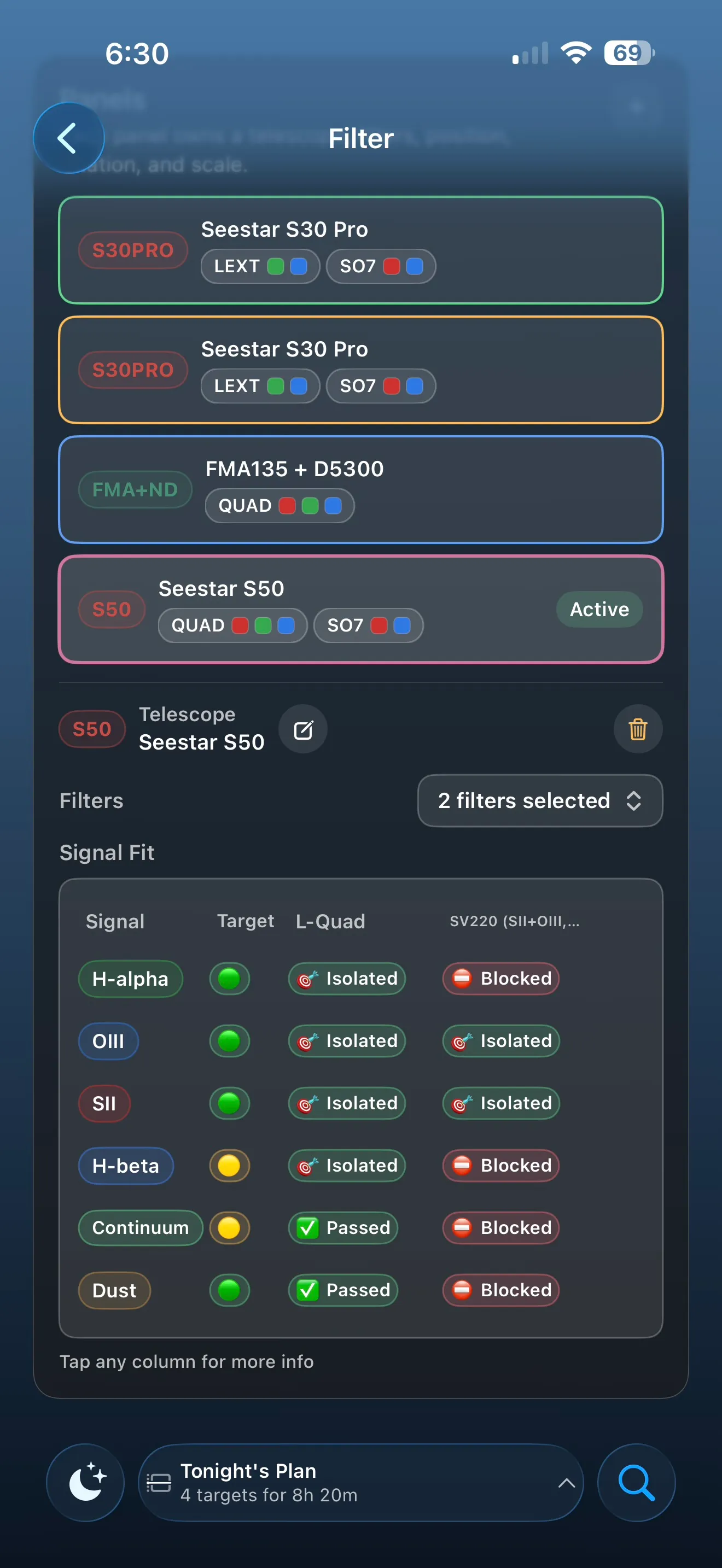
Filter Fit helps demystify the relationship between subjects and filters. For each panel in your composition, Filter Fit shows how different parts of the visual spectrum are represented by the subject, then evaluates how each chosen filter responds to that signal.
Signals Evaluated
AstroGuide groups subject signal into emission bands and broadband components. Emission bands are narrow wavelengths associated with glowing gas. Broadband components describe light spread across wider parts of the spectrum, such as starlight, reflected light, and dust structures.
- Emission bands
- H-alpha: a deep red hydrogen signal. H-alpha is one of the strongest and most common signals in emission nebulae, and it is often the backbone of narrowband images.
- OIII: a blue-green oxygen signal. OIII often highlights shells, shock fronts, planetary nebulae, and contrast within emission regions.
- SII: a red sulfur signal. SII is usually weaker than H-alpha, but it can add important structure and color separation in palettes such as the Hubble Palette.
- H-beta: a blue hydrogen signal. H-beta is often weaker than H-alpha, but it can help describe the blue side of hydrogen emission and can matter for certain filters and subjects.
- Broadband components
- Continuum: broad-spectrum light, especially starlight. Continuum signal is important for stars, clusters, galaxies, and the natural star field around a subject.
- Reflection: light from nearby stars reflected by dust. Reflection signal often appears bluish and can be important in subjects such as reflection nebulae and dusty regions around bright stars.
- Dust: dark lanes, warm dust, and dusty structures that shape the subject. Dust can be visible in broadband captures and can also help explain why a subject benefits from combining broadband and narrowband data.
Subject Evaluation
AstroGuide evaluates the subject using catalog metadata, known object classifications, and curated signal characteristics where available. The goal is to describe the main signals that matter for planning, not to replace scientific spectroscopy or a calibrated imaging workflow.
- Strong: the signal is expected to be a major contributor for this subject.
- Weak: the signal may be present, but it is not expected to dominate the capture.
- None: AstroGuide does not expect this signal to be meaningful for this subject.
Filter Evaluation
AstroGuide compares the selected filter against the subject's expected signals.
- Isolated: the filter is designed to emphasize this signal while suppressing much of the surrounding spectrum.
- Passed: the filter allows this signal through, but does not strongly isolate it.
- Blocked: the filter suppresses or excludes this signal.
Overall Evaluation
- Good: this filter and subject combination is likely to work well.
- Mixed: this filter can produce acceptable results, but is compromised in a meaningful way. It may be useful for special cases, but should be chosen intentionally.
- Poor: this filter is probably not a good match for the subject.
Sub-Length Advisor
The optimum sub-exposure length for a subject is difficult to determine. There are objective and subjective factors to consider, and sub-exposure length works together with total integration time. Both choices help improve signal-to-noise ratio and give you a clearer, more accurate image of your intended subject.
Factors Influencing Sub-Length
AstroGuide builds a recommendation from several kinds of information:
- Sky brightness
- Subject characteristics
- Conditions
- Equipment
Sky Brightness
Background sky brightness is one of the key factors in determining sub-exposure length. The brighter the sky is, the more quickly the camera records background brightness along with the subject. Brighter skies generally lead to shorter sub-exposures, while darker skies allow for longer sub-exposures.
The main factors that influence sky brightness are:
- Light pollution: the intrinsic brightness of your observing site, often described with SQM or Bortle rating.
- Lunar influence: the brightness of the Moon and its angular separation from your intended subject.
- Airmass: the lower a subject is in the sky, the more atmosphere you have to image through. That additional atmosphere can behave like extra sky brightness.
- Light domes: nearby cities, stadiums, and other artificial light sources can create directional differences in sky brightness beyond the light pollution measured at the exact observing site.
Subject Characteristics
Subject characteristics help AstroGuide estimate how much useful signal you are likely to collect in each exposure.
- Apparent magnitude: a measure of the subject's total brightness as seen from Earth. Lower magnitude numbers are brighter, but the total brightness may be spread across a large area.
- Surface magnitude: an estimate of how bright the subject appears per unit of area. This can be more helpful than apparent magnitude for large nebulae and galaxies because it describes how concentrated or diffuse the light is.
- Subject declination: declination is not a direct exposure factor, but it affects how high the subject can climb from your observing latitude. Altitude changes can affect airmass and may also interact with equipment limits or local obstructions.
Conditions
Beyond brightness, practical observing conditions can influence a sub-exposure decision. The longer the sub-exposure, the more opportunity there is for a frame to be affected by vibration, optical changes, passing clouds, aircraft, satellites, or other interruptions.
- Wind: excessive wind can cause vibrations or tracking errors.
- Humidity: increased humidity can make focus and optics less stable.
- Transient obstructions: clouds, planes, and satellites can ruin individual frames.
Equipment
Finally, your equipment affects the recommendation.
- Filter choice: a filter that isolates a strong component of the subject can improve signal-to-noise ratio. A filter that suppresses key components can reduce useful signal and push the plan in the wrong direction.
- Tracking accuracy: more accurate tracking allows longer sub-exposures before stars begin to trail.
- Mount type: equatorial mounts generally allow longer sub-exposures because they track the sky with motion around one primary axis.
- Sub-length limits: some cameras support a broad continuous range of exposure lengths, while others offer a smaller set of fixed choices.
The Sub-Length Ledger
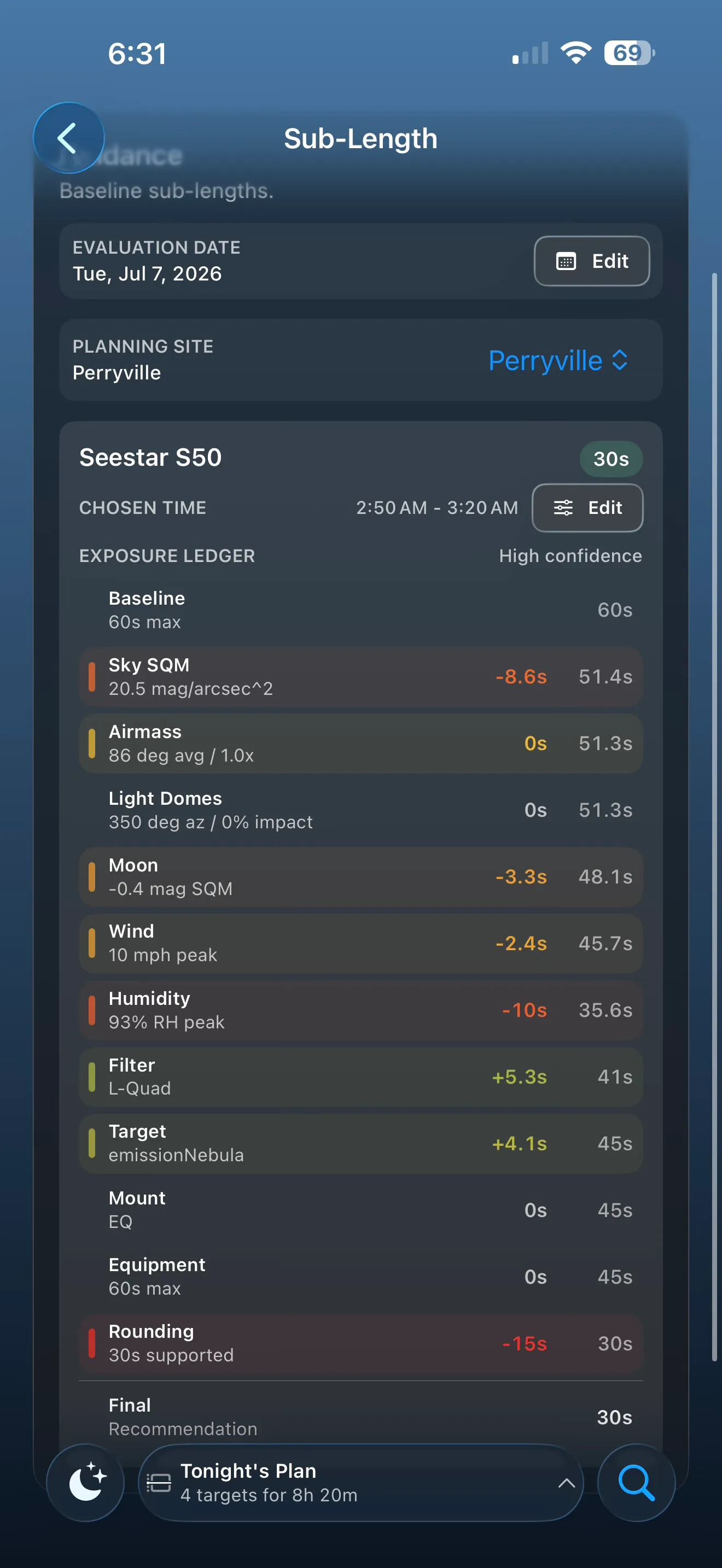
Based on these factors, Sub-Length Advisor builds a ledger that shows how each factor influences the recommendation. The calculation uses a few operational choices:
- Planning site: the site influences light pollution, altitude, local sky context, and other planning factors.
- Evaluation date: the date determines lunar impact and can provide weather or condition context where available.
- Chosen time: by default, Sub-Length Advisor can choose an ideal hour based on subject altitude. You can also specify a particular timespan.
Integration Advisor
Integration Advisor estimates how much total capture time you may want for the subject and quality goal you have in mind. It connects the rest of Capture Studio into one planning number: the subject you are imaging, the telescope and filters assigned to each panel, the expected sky brightness at your site, moon and condition context where applicable, the sub-exposure guidance, and your desired result quality.
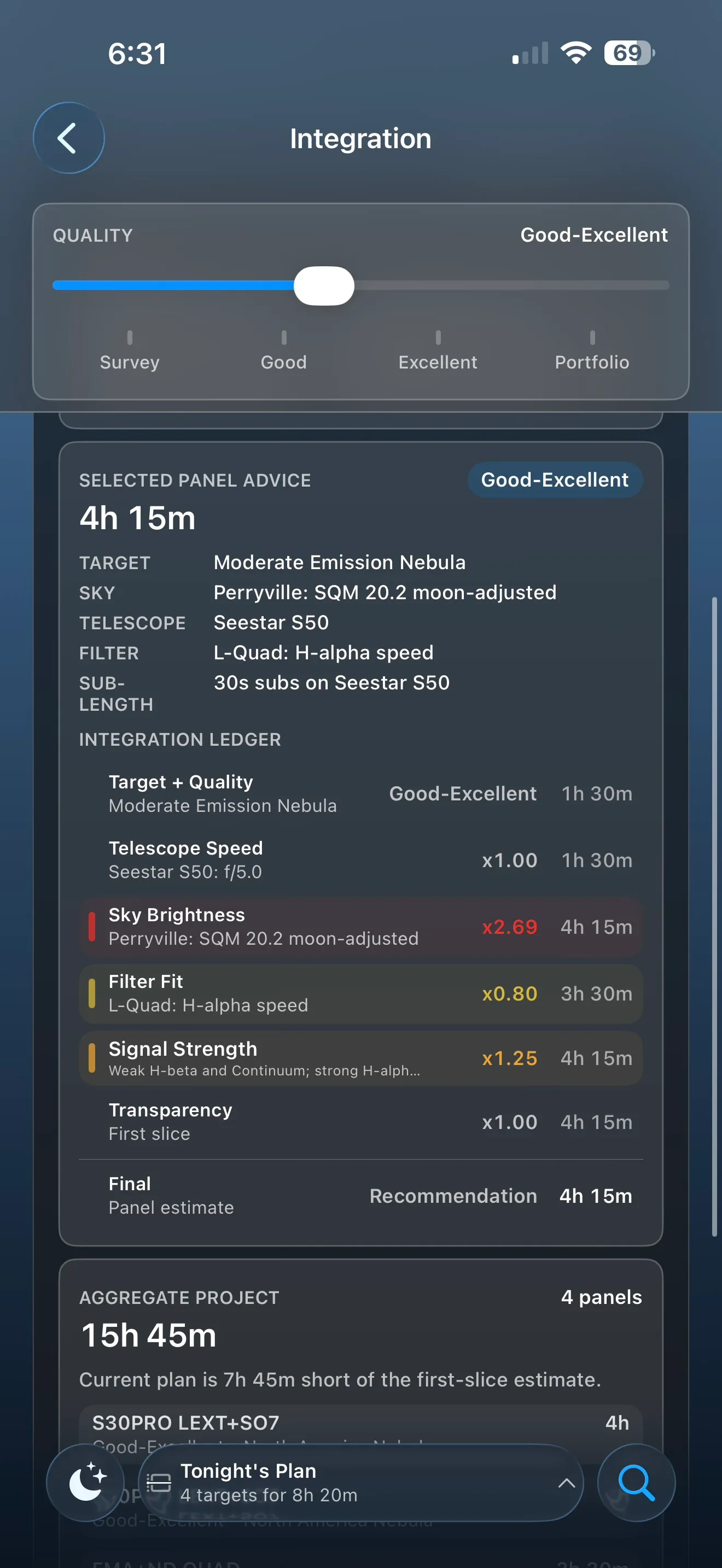
For a single-panel project, Integration Advisor focuses on the selected subject, telescope, filter, and site context. For a multi-panel composition, it estimates each panel separately and then rolls those estimates into a project total. This helps you see whether the full idea is a one-night project, a multi-night project, or something that should be split into smaller goals.
Quality Goal
Your quality goal tells AstroGuide what kind of result you are planning for. A quick reference capture, a good finished image, and a deeper high-quality image do not need the same amount of time. Integration Advisor uses the selected quality level to scale the recommendation so the estimate matches your intent.
Planning Context
Integration Advisor considers several planning factors:
- Subject difficulty: faint, diffuse, or low-surface-brightness subjects usually need more time than brighter, more concentrated subjects.
- Equipment fit: telescope speed, field of view, and selected filters influence how efficiently the plan gathers useful signal.
- Site and sky brightness: darker skies generally reduce the time needed to reach a comparable result, while brighter skies can require more total integration.
- Moon and conditions: moon phase, lunar separation, transparency, and other conditions can shift the estimate when they are relevant to the plan.
- Filter fit: a filter that captures a strong signal from the subject can make the plan more efficient. A filter that blocks important signal can make the plan less efficient.
- Sub-exposure guidance: sub-length recommendations help keep individual frames practical while the integration estimate focuses on the total time goal.
Integration Ledger
The Integration Advisor ledger explains why the estimate moved up or down. Depending on the plan, it may show rows for quality goal, telescope speed, sky brightness, filter fit, signal strength, transparency, and the final recommendation.
The recommendation is planning guidance, not a guarantee of final image quality. Processing skill, focus, guiding, calibration frames, clouds, wind, sensor behavior, and many other real-world details still matter. Use the estimate as a starting point for planning, then adjust based on your own equipment, experience, and results.
Saving A Capture Studio Plan
When the plan looks right, AstroGuide Pro users can save it as a Goal. A saved Capture Studio plan can include framing context, selected telescope and filters, filter guidance, exposure guidance, integration guidance, and composition metadata. After capture sessions are imported into Results, AstroGuide can connect that progress back to the saved goal so you can see what is complete, what remains, and whether the plan should be continued, revised, or archived.